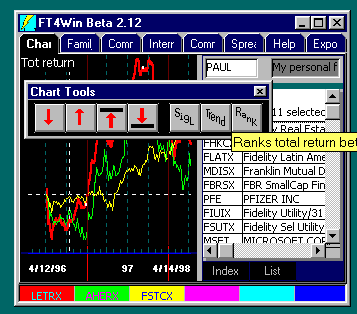
Ranking is an important investment selection tool. FastTrack provides a Rank tool to
rank the issues on the Chart Tab list. If only the Dashed Pole is showing, FastTrack
computes results from the date on which the Dashed Pole rests to the last day of the
chart. If both the
poles are showing, the ranking is
based on results between poles.
 While FastTrack for DOS was limited to ranking based on only total
return, FastTrack for the Web can rank on a wide variety of values.
While FastTrack for DOS was limited to ranking based on only total
return, FastTrack for the Web can rank on a wide variety of values.
Here
is a set of specific instructions and keystrokes to rank a family and have the ranking
displayed in the Issue List:
- Load the family you want to rank into the Chart Tab Issue List.
- Move the Dashed Pole to the starting date of the ranking. If you are going to rank to
the last day of data, then no other pole is needed. If you want to rank a specific period,
bracket it with the Dashed and Solid Poles.
- Click on the Chart Tools Rank Button. This will
- clear the spreadsheet,
- refill it from the Chart Tab Issue List,
- compute a return column,
- sort the column greatest gain to lowest gain,
- place the sorted results in the Chart Tab Issue List,
- and switch to the Spreadsheet Tab.
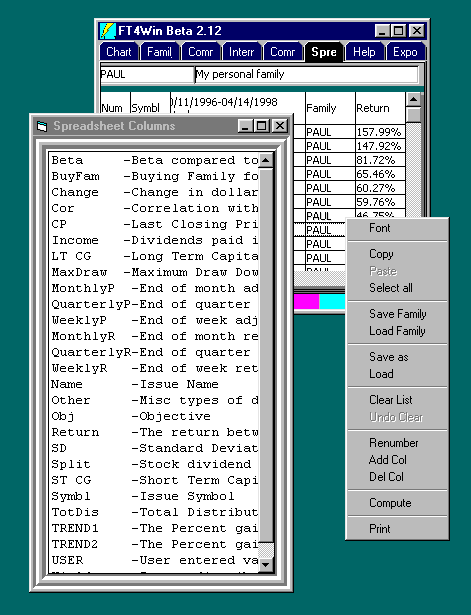
- To rank a family by other category, go to the "Spreadsheet" tab on the
Program Tabs. This will open up the Spreadsheet window. From here
you can sort the mutual funds in whatever order you want. Once sorted, click one of the family
members, hold until the drag icon appears, then drag to the "Charts" Program
Tab.
 To add more columns to the spreadsheet:
- Right-click on the spreadsheet itself. This pops up a menu.
- Select "Add Col". This will bring up a list of available values that can
become columns on the spreadsheet.
- Double-click on the desired columns to add them to the spreadsheet.
You'll note that the newly added columns are empty. To fill them:
- Right-Click on the spreadsheet.
- Choose "Compute". This will recalculate the contents of the spreadsheet.
Obviously, this can take a long time if you choose many columns and many issues.
Once the spreadsheet is filled, you'll note that the columns are in no particular
order.
- Click on the top row of the column you want to use as a sort key. The list will be
sorted by the values in the column.
- If you want the list to be sorted in reverse order, click on the top of the column
again.
If you want the data sorted in the opposite order, click the spreadsheet column header.
This will reverse the sort order. You will have to drag one item from the sorted list to
the Char Tab if you want to see the Issue list in the new order.
 To rank a family in FastTrack for the
Web by total return by the period on the screen (or
To rank a family in FastTrack for the
Web by total return by the period on the screen (or  appears.