Distribution Adjustment Work Sheet
This worksheet shows how to compute distribution-adjusted total return
between any two
points.
Fund and stock prices must be adjusted for distributions
(the white dots on the redline of the T Chart)
to reflect an accurate picture of the fund performance over time. FastTrack computations
reinvest distributions at the closing price on the x-dividend day. All historical prices
from the day before the x-dividend date are reduced backward in time. When a split occurs,
prices are reduced by the split ratio. For example, when 3-for-1 split occurs, prices
before the x-dividend date will be multiplied by 1/3. A 1-for-5 reverse split is handled
the same way: Prices before the x-dividend date will be multiplied by 5. The
worksheet below shows how to compute distribution-adjusted prices and compute a total
return between any two points with intervening distributions.
See the Easy Way
Below
Adjusted Price and Total Return Worksheet
* Distribution Adjustment
Example (without stock split)
* Distribution Adjustment Example (with
stock split)
- Write down :
Symbol __________ from starting date ________ to last date in the database _________.
- Display the T Chart for the ticker Symbol as the red line. Show the entire data range.
Place the dashed pole on the "starting date". FT shows a BP= value in the
performance values on the right side of the screen. This is total return from the
"starting date" to the "last date". Record BP= below.
- Without moving the pole record the CP= value in First CP= below
- Move the dashed pole to the last day and record in Last CP= below.
- Record the Distribution Amount by moving the pole from the "to last date" to
the "from staring date". Stop in each distribution (white dot) and read the information in
the white box that pops up. Record the X-date and Closing Price in the table below. If there are
multiple distributions on the same white dot, sum
the distributions and record as a single Distribution Amount.
You may have to click and hold on the white box higher and drag it higher to see all it's information. Do not sum split
ratios. You may sum split values when we give a $ amount for fund splits. Record split
ratios in the Split Ratio column. A 2 for 1 split would be recorded as 1/2. If there
is no split on that distribution day, then record the value=1.0 under Split
Ratio . The ratio recorded will
be multiplied in step #1 below.
BP= First
CP= Last CP =
____________%
$___________ $___________
|
- To compute the Adjustment Factor
(AdjFactor), do the following:
AdjFactor = Split Ratio
X ( Closing Price / (Closing Price + Distribution Amount) ).
- When all AdjFactors have been computed, multiply them all together to get the
Product of All
Adjustment Factors (PofAll).___________ .
- Multiply the First CP and PofAll to produce the
Adjusted 1st Price(
Adj1stPrice) _______________.
This is the adjusted price that FastTrack uses internally for its calculations. It is also
the price that FastTrack would export to MetaStock and other programs that do not record
distributions. Adjusted prices are not the same as daily close, unadjusted prices which appear in the Wall
Street Journal everyday and in your brokerage statements.
- Do the final calculation to get the total return recorded as BP= above.
[(Last CP -
Adj1stPrice ) / Adj1stPrice] x 100 = _________%. <===RESULT
If RESULT does not match BP= as recorded above the table, then you have done something
wrong. You may call FT technical support for assistance.
Summary
This exercise shows you how FastTrack gets its total return figures through a process
of adjusting prices, internally, for distributions. This is an arduous process to do by
hand. Choose short periods which include only one distribution and that end at the last
day in the database. This will substantially reduce the number of hand calculations
required.
The Easy Way to Check
You can use Excel to examine FT4Web calculations: Do the following.
- Display the issue and period for which you want to calculate the distributions.
- Move the pole to the last day of the chart. A summary of distributions appears
on the screen.
- Start Excel and load the file C:\FT\FT4WIN\TEMP\FTDIS.CSV . This little file is overwritten
automatically each time you display a summary in step #2. It contains a spreadsheet that will do
the calculations in Excel including math formulas, not just raw data.
NOTE: Excel has an optional method of cell reference called "R1C1". If you are using R1C1, then
Excel will show an errors. Click the Tools menu
item/options/general tab and deselect the R1C1 option. Shut down Excel, and then reload FTDIS.CSV.
|
|

NOTE:
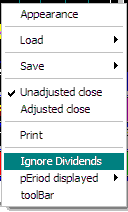
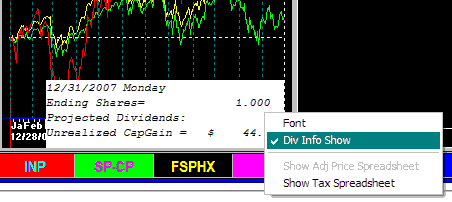
The menu selection "Div Info Show" must be check marked for the FTDIS.CSV file to be written.
Also, the "Ignore Dividends" menu (right-click the chart) item must be unchecked. |